A rejected withdrawal on BDG Win almost always has one of 7 causes, and 5 of them are on the player’s side: a bank account added with a wrong digit, a name that does not match, a USDT address on the wrong network, a bonus condition not yet met, or a second request placed while the first was still processing. The other 2 are timing, and the platform is clear about the timing: it states withdrawals are processed within 1 to 24 hours or more, after which the bank takes 1 to 7 working days. This page walks the 7 causes in the order they happen, shows the exact screens to check, and ends with the honest support route. No fee, no agent, no Telegram fixer can speed any of it.
How a BDG Win withdrawal actually works
Wallet, then Withdraw, then choose the mode: Bank Card or USDT. Before either works, the bank account or the USDT wallet has to be added to the account; the withdraw screen will not accept an amount without a linked destination. Enter the amount, confirm, and the request goes into processing.
Processing is done on the platform’s side, and the platform states it takes 1 to 24 hours or more. When it is approved, the money leaves for the bank, and the bank takes 1 to 7 working days to show it, longer around holidays. Rejected means the platform did not send it, and the amount returns to the wallet.
One thing to fix in your head first: UPI is a deposit route on this platform, not a withdrawal route. Withdrawals go to a bank account or to USDT. A withdrawal to UPI id does not exist, so any guide that mentions it is describing a different site.
Reason 1: the bank account details are wrong
The most common rejection. An account number with one digit off, an IFSC that belongs to a different branch, or an account that has been closed. The platform sends to what you typed, the bank bounces it, and the request shows rejected.
Open Wallet, then the bank card section, and read the saved account number and IFSC against your passbook or your banking app, character by character. If anything differs, add the correct account and place the withdrawal again.
Reason 2: the name on the bank account does not match
Banks check that the beneficiary name matches the account. If the account was added under a nickname, a spelling from Aadhaar that differs from the bank record, or a family member’s name, the transfer fails and the platform marks it rejected.
Use the name exactly as the bank prints it on the passbook or in the banking app, including the order of first and last name. A bank account in your own name is the only safe choice; withdrawing to someone else’s account is the fastest way to a rejection.
Reason 3: USDT address on the wrong network
For the USDT mode, the address has to match the network shown on the withdraw screen. Paste an address from a different network and the transfer is either rejected by the platform or lost on the chain, and the second case cannot be reversed by anyone.
Copy the address from your wallet app while it is set to the same network the platform lists, paste it, and check the first and last four characters before confirming. Never type an address by hand.
Reason 4: a bonus condition is not complete
Bonuses from the first-login reward, cashback or an event can carry a betting condition shown in the wallet. Until that condition is met, a withdrawal that includes the bonus amount is rejected.
Check the wallet screen for any requirement text before you withdraw. If one is shown, either complete it with small bets or withdraw only the part that is free of the condition, if the platform allows a partial amount. The condition amount is whatever the app shows; nobody outside the app can quote it.
Reason 5: a second request placed during processing
Placing another withdrawal while the first one is still inside the 1 to 24 hour window often ends with one of them rejected. The platform processes one request against the balance, and the second no longer matches the available amount.
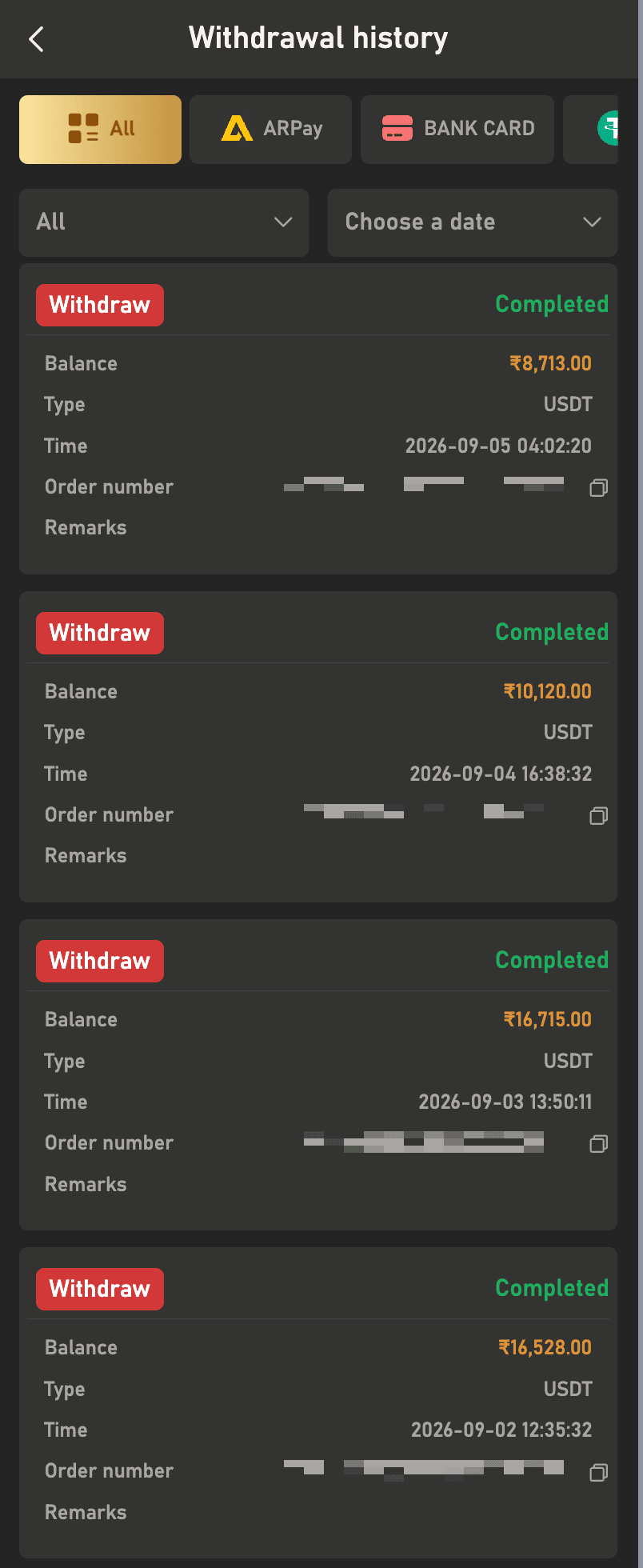
Wait for the first request to finish. Watch it under Wallet, then Withdrawal history, where each request shows its own status, type, time and order number. Only after it reads completed or rejected should you place another.
Reasons 6 and 7: the pending window and bank days are not a rejection
Pending for 20 hours is inside the platform’s stated window, not a problem. Completed on the platform but not in the bank after 2 days is inside the bank’s stated window, also not a problem. A request only needs action when it reads rejected, or when both windows have passed with nothing in the bank.
The withdrawal history screen is the proof. Completed entries carry the amount, the type, the time and an order number. When you contact support, that order number is what they ask for.
- Open Wallet, then Withdrawal history, and read the status on the request.
- Pending: wait out the 1 to 24 hour window before doing anything.
- Rejected: work through reasons 1 to 5 above, fix the one that applies, and request again.
- Completed but not in bank: count 1 to 7 working days from the completed time, skipping bank holidays.
- After both windows: note the order number, amount and time from the history screen.
- Go to Account, Service Centre, Customer Service, choose the withdrawal issue, and send the order number, user ID, amount, time and a screenshot of the history entry.
- Do not place a fresh withdrawal for the same money while the ticket is open.
Who cannot fix a rejected withdrawal, whatever they promise
Nobody on Telegram or WhatsApp. The person offering to release a withdrawal for a fee, or asking for your OTP to verify the bank, is running the same scam that follows every rejected request. The platform processes withdrawals through its own system, and no agent has a button for yours.
The only routes are the in-app Customer Service button, the Service Centre form, and the Telegram support channel linked on this site for general questions. The full support map, including what to write so the ticket is solved first time, is at bdgwin365.in/bdg-win-customer-care-number/. Deposit-side problems have their own checklist at bdgwin365.in/bdg-win-deposit-not-received/.
Register or log in from bdgwin365.in/, and get the current app from bdgwin365.in/download/ so the withdraw screen you see matches this page. Real-money games are for players aged 18 and over, and the platform restricts Andhra Pradesh, Telangana, Assam, Odisha, Nagaland and Sikkim.
Frequently asked questions
How long does a BDG Win withdrawal take?
The platform states it processes within 1 to 24 hours or more, and the bank then takes 1 to 7 working days, longer on holidays. Anyone quoting a fixed 10 minutes or 2 hours is not quoting the platform.
Can I withdraw BDG Win money to UPI or PhonePe?
No. UPI and PhonePe are deposit routes on this platform. Withdrawals go to a linked bank account through the Bank Card mode, or to a USDT wallet.
Why does my withdrawal keep getting rejected with the same bank?
Check the account number, IFSC and the name as the bank prints them. A single wrong character or a name in a different spelling causes the same rejection every time until it is corrected.
Is there a minimum withdrawal amount on BDG Win?
The platform does not publish a minimum, a limit or a count per day on the site. Whatever the withdraw screen accepts or refuses is the current rule; do not trust a number from a video.
My withdrawal shows completed but the bank has nothing. What now?
Count 1 to 7 working days from the completed time, excluding bank holidays. If that window has passed, open a ticket through Customer Service with the order number from the withdrawal history screen.
Someone offered to release my rejected withdrawal for Rs 500. Should I pay?
No. No person outside the platform can release anything, and the real support routes never charge. Paying loses the Rs 500 and usually the account login as well.
Register or log in to BDG Win Download the BDG Win app
Real-money games are for players aged 18 and over. Play with money you can afford to lose and stop when your limit is reached.
BDG Win game guides
- BDG Win Win Go game: how colour prediction works
- BDG Win Chicken Road game: download and how to play
- BDG Win Aviator game
- BDG Win Mines game: how it works
- BDG Win K3 game kaise khele
- BDG Win 5D game: the 5-digit lottery
- BDG Win MotoRace game: bet on the top three
- BDG Win TRX Win Go: hash result explained
- BDG Win Plinko game
- BDG Win PUBG game: 1, 3 and 5 minute rounds
- BDG Win Dragon Tiger game
- BDG Win rummy: V8, KoolBet and Card365 lobbies
- BDG Win Andar Bahar: where it is and how a hand works
- BDG Win Keno game: how the number draw works
- BDG Win Limbo game: target multiplier rounds
- BDG Win Rocket game and Rocket Dice
- BDG Win Vortex game: how to open and read it
- BDG Win HiLo game: higher or lower
- BDG Win Tower game: climb and collect
- BDG Win Dice game: over or under
- BDG Win Mini Roulette: the small wheel
- BDG Win Blackjack: Multihand Pro 2 and V8
- BDG Win Draw Poker: hold and draw
- BDG Win Horse Racing game: virtual races
- BDG Win fishing games: Jackpot, Happy, One Shot
- BDG Win Lucky 777 slot: classic reels
- BDG Win Slots: Lucky 777 and more
- BDG Win Sports prediction
Help guides
- BDG Win app download
- BDG Win APK old version: why it fails
- BDG Win deposit not received: 6 checks
- BDG Win customer care number: real routes, fake numbers
- BDG Win withdrawal rejected: 7 reasons and fixes
- BDG Win band ho gaya kya? Not opening, server, locked
- BDG Win on iPhone: iOS without an APK
- BDG Win jitne ka tarika: trick ka sach
- BDG Win real or fake: 7 checks
- Is BDG Win legal in India? State rules
- Who is the owner of BDG Win, kis desh ka hai
- BDG Game prediction, tools and VIP HD ka sach
- Colour prediction hack aur trick ka sach
- BDG Win new version APK download and apk link
- BDG Win login 500 bonus: what it really is
- How to delete a BDG Win account
8 Responses