An APK file cannot install on an iPhone. That is the whole answer to the search bdg game download apk apple: APK is the Android package format, and iOS does not open it, no matter which site promises an iPhone version. BDG Win, which players also call BDG Game, still works fine on iPhone and iPad, because the full platform runs in Safari and can be pinned to the home screen so it opens like an app. Below: the 4-tap install, what the Add to Desktop prompt in the lobby does, the iOS profile scam to avoid, and how login and money work on Apple devices.
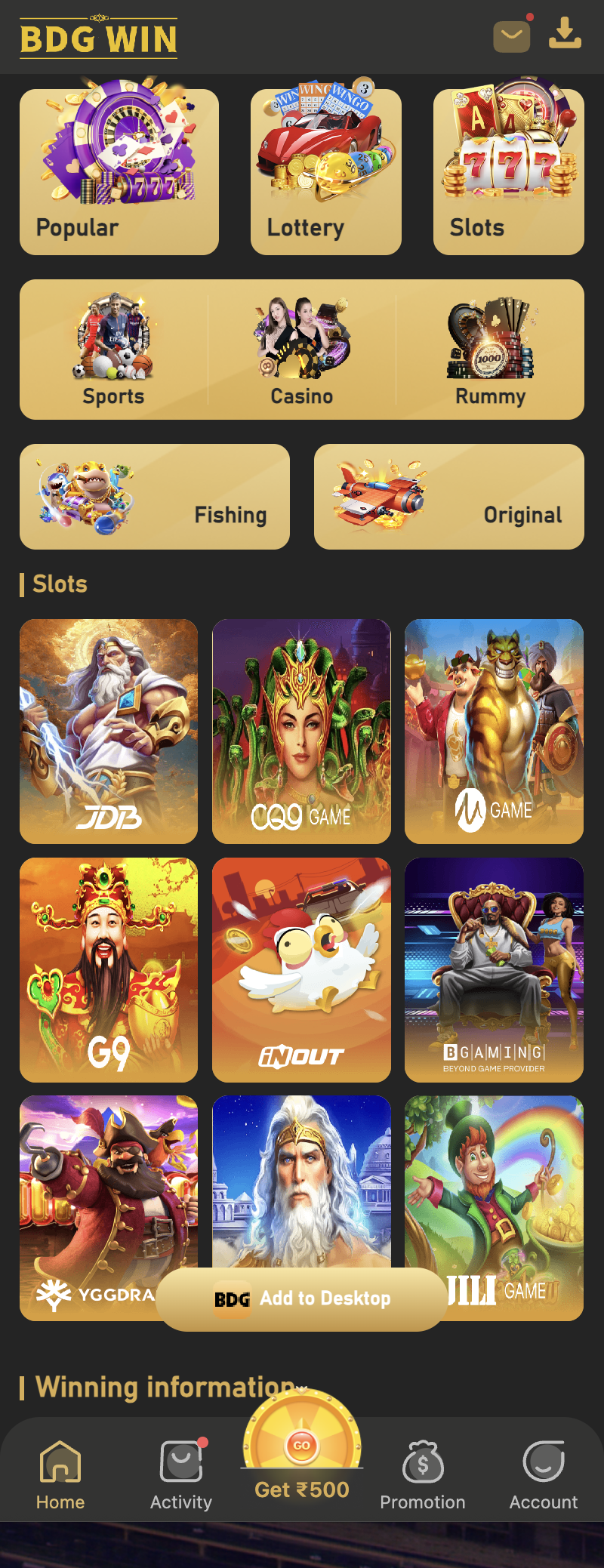
Can I download the BDG Game APK on an Apple iPhone?
No. APK stands for Android Package, and iPhone runs iOS, which only installs apps from the App Store or through a developer profile. A website that offers a BDG Win APK for iPhone is either confused or trying to get you to install something else.
The good news is that you do not need an APK. The same platform that the Android app opens is a website, and Safari on iPhone runs every part of it: register, login, Win Go, Chicken Road, Aviator, deposit, withdraw, customer service. Nothing is missing on iOS.
So if you own an iPhone, skip every download link and go to the website at bdgwin365.in/ from Safari. The steps below turn it into a home-screen app.
How to install BDG Win on iPhone in 4 taps
This uses Safari’s Add to Home Screen feature. Chrome on iPhone can do it too, but Safari is the reliable one.
- Open Safari and go to bdgwin365.in/, then tap the Register or Login button to reach the official site.
- Log in with your registered mobile number and password, or register with a mobile number and password if you are new.
- Tap the Share icon at the bottom of Safari, the square with the arrow pointing up.
- Scroll the share sheet and tap Add to Home Screen.
- Keep the name or shorten it to BDG Win, then tap Add at the top right.
- Go to your home screen. The new icon opens the platform full screen, without the Safari bar.
- Log in once inside it. Safari keeps you signed in for the next visits until you log out.
What is the Add to Desktop prompt inside the lobby?
Once you log in, the lobby shows a small BDG Add to Desktop button near the bottom of the screen. On Android it triggers the install prompt for the web app. On iPhone, Safari does not allow websites to install themselves, so that button cannot do the job; it simply reminds you that the option exists.
That is why the Share icon route above is the one that works on iOS. The result is the same: an icon on the home screen, full-screen opening, and the same wallet and login as the Android app.
The iOS profile and TestFlight scam to avoid
Because iPhone users cannot install APKs, a different scam targets them. A site or Telegram post offers a BDG Win iOS app and asks you to install a configuration profile, or to join a TestFlight link, or to trust an enterprise developer in Settings.
None of that comes from the platform. A configuration profile can route your traffic and read what you type; a fake app built to look like BDG Win exists only to take the mobile number and password you enter into it and to send its own UPI id for deposits.
If any page asks you to go to Settings, General, VPN and Device Management, stop. The real platform needs nothing installed on iOS. Use Safari, or the home-screen icon made from Safari.
Login, deposit and withdrawal on iPhone
Everything works the same as on Android because it is the same website. Your mobile number and password log in on any device, and the wallet is shared, so a deposit made from an Android phone shows on the iPhone at once.
Deposit from iPhone: Wallet, Deposit, choose a channel from Wake UP-APP, UPI-QRPay, UPI-PayTM, USDT or ARPay, enter the amount, pay from PhonePe, Google Pay or Paytm on the same phone, then submit the UTR and the exact amount. If a deposit does not credit, the checks at bdgwin365.in/bdg-win-deposit-not-received/ apply on iPhone too.
Withdrawal from iPhone: Wallet, Withdraw, choose Bank Card or USDT, with the bank account or wallet added first. The platform states it processes within 1 to 24 hours or more, then the bank takes 1 to 7 working days.
Does BDG Win work on iPad and Mac too?
Yes. iPad follows the exact same Safari steps and gives a larger view of the lobby, which helps in games like Win Go where the round timer and the bet panel sit on one screen. On a Mac, open the site in Safari or Chrome and log in; there is no install step at all.
One caution for shared devices: a family iPad that stays logged in is a wallet anyone can open. Log out from Account when you finish, and keep the password to yourself.
BDG Game iPhone me kaise chalaye, short me
APK iPhone par nahi chalta, aur chalane ki koshish bhi mat karo. Safari kholo, bdgwin365.in/ par jao, Register ya Login dabao, phir Share icon se Add to Home Screen kar do. Bas, icon ban gaya.
Login wahi mobile number aur password, wallet wahi. Deposit UPI se, withdrawal bank account ya USDT me. Koi profile install karne ko kahe, ya TestFlight link de, to wo platform nahi hai.
Android phone bhi hai to app ka link bdgwin365.in/download/ par hai, aur purane version ka jawab bdgwin365.in/bdg-win-apk-old-version/ par.
Frequently asked questions
Is there a BDG Win app on the App Store?
We cannot point to an App Store listing, so do not trust one that appears in a search ad or a Telegram post. The platform runs in Safari and installs to the home screen from the Share menu, which gives the same experience without an App Store download.
Will the home-screen icon log me out every time?
No. Safari keeps the login for the icon until you log out from Account or clear Safari data. If it does log out, sign in again with your mobile number and password; nothing is lost because the wallet lives on the platform, not on the phone.
Can I use the same account on iPhone and Android?
Yes. One account, one mobile number, one wallet, any device. Do not register a second account from the other phone, because multiple accounts are not allowed on the platform.
Why does a site say bdg game apk for iOS download?
Because people type it. The file it gives you is either an Android APK that will not open, or a profile or lookalike app that exists to take your login. iOS needs neither.
Does UPI payment work from the iPhone version?
Yes. The deposit screen shows the UPI id or QR, you pay from PhonePe, Google Pay or Paytm on the same iPhone, then submit the UTR and exact amount as usual.
Register or log in to BDG Win Download the BDG Win app
Real-money games are for players aged 18 and over. Play with money you can afford to lose and stop when your limit is reached.
BDG Win game guides
- BDG Win Win Go game: how colour prediction works
- BDG Win Chicken Road game: download and how to play
- BDG Win Aviator game
- BDG Win Mines game: how it works
- BDG Win K3 game kaise khele
- BDG Win 5D game: the 5-digit lottery
- BDG Win MotoRace game: bet on the top three
- BDG Win TRX Win Go: hash result explained
- BDG Win Plinko game
- BDG Win PUBG game: 1, 3 and 5 minute rounds
- BDG Win Dragon Tiger game
- BDG Win rummy: V8, KoolBet and Card365 lobbies
- BDG Win Andar Bahar: where it is and how a hand works
- BDG Win Keno game: how the number draw works
- BDG Win Limbo game: target multiplier rounds
- BDG Win Rocket game and Rocket Dice
- BDG Win Vortex game: how to open and read it
- BDG Win HiLo game: higher or lower
- BDG Win Tower game: climb and collect
- BDG Win Dice game: over or under
- BDG Win Mini Roulette: the small wheel
- BDG Win Blackjack: Multihand Pro 2 and V8
- BDG Win Draw Poker: hold and draw
- BDG Win Horse Racing game: virtual races
- BDG Win fishing games: Jackpot, Happy, One Shot
- BDG Win Lucky 777 slot: classic reels
- BDG Win Slots: Lucky 777 and more
- BDG Win Sports prediction
Help guides
- BDG Win app download
- BDG Win APK old version: why it fails
- BDG Win deposit not received: 6 checks
- BDG Win customer care number: real routes, fake numbers
- BDG Win withdrawal rejected: 7 reasons and fixes
- BDG Win band ho gaya kya? Not opening, server, locked
- BDG Win on iPhone: iOS without an APK
- BDG Win jitne ka tarika: trick ka sach
- BDG Win real or fake: 7 checks
- Is BDG Win legal in India? State rules
- Who is the owner of BDG Win, kis desh ka hai
- BDG Game prediction, tools and VIP HD ka sach
- Colour prediction hack aur trick ka sach
- BDG Win new version APK download and apk link
- BDG Win login 500 bonus: what it really is
- How to delete a BDG Win account
One Response